IGI-2 Multiplayer launcher for players with a legally owned copy of Project I.G.I. 2: Covert Strike.
⚠️ HcLauncheR does not include IGI-2 game files. You must own a legitimate copy of IGI 2: Covert Strike to use this launcher.
 Download HcLauncheR
Running Version:
4.1.2.0
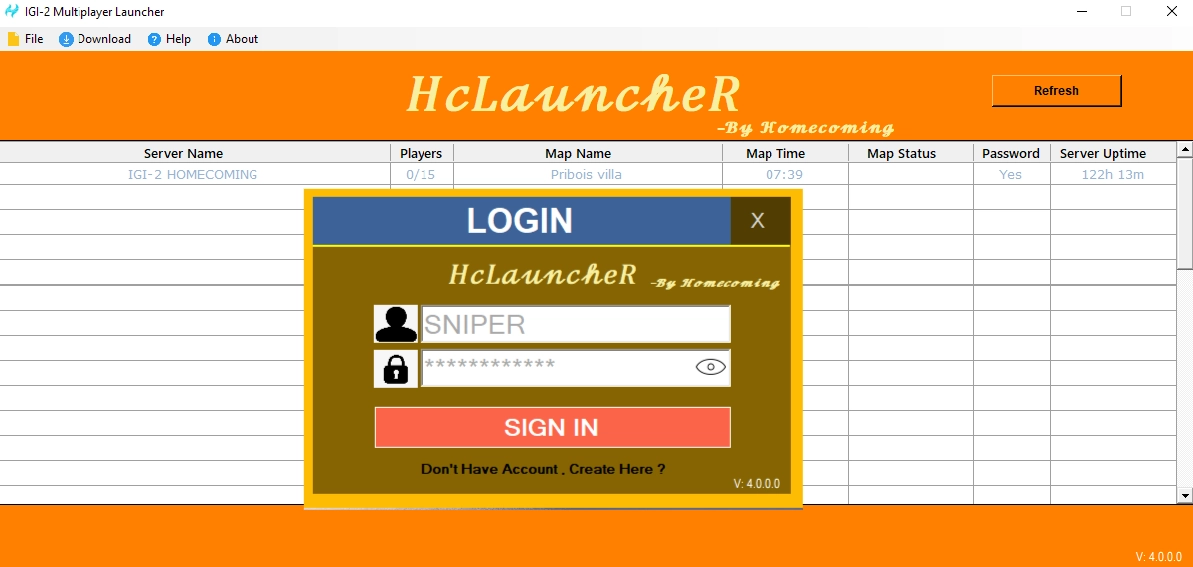
HcLauncheR is a Windows launcher developed for the IGI-2 Multiplayer community. It provides a simple way for players to set up the multiplayer environment and connect with the Homecoming Gaming community.
The launcher is designed to work with a legally obtained copy of Project I.G.I. 2: Covert Strike. It does not contain or distribute the original game files.
Before installing HcLauncheR, make sure your IGI-2 installation is available and that your system meets the requirements listed below.
HcLauncheR is lightweight and designed to run alongside IGI-2 Multiplayer with minimal system resources.
Before installing the launcher, make sure your Windows system meets the following requirements.
Follow the steps below to install and configure HcLauncheR for IGI-2 Multiplayer.
💡 Make sure you have a legally purchased copy of IGI-2 Covert Strike before installing HcLauncheR.
HcLauncheR.zip
using the download button on this page.
HcLauncheR.zip
using Windows extraction or another ZIP utility.
ReadMe.txt
and read the installation instructions before continuing.
HcLauncheR.msi.
IGI-2 Covert Strike\pc
folder.
Watch this step-by-step tutorial to learn how to download, extract, install and configure HcLauncheR for IGI-2 Multiplayer.
HcLauncheR is a Windows launcher for IGI-2 Multiplayer, developed for the Homecoming Gaming community. It provides players with a central way to set up the multiplayer environment and access available community resources.
HcLauncheR is intended to be used with a legally obtained copy of Project I.G.I. 2: Covert Strike. The launcher does not include or distribute the original game's files.
The launcher can be used together with other Homecoming Gaming projects. HcCommanDeR provides server management functionality, while HcBan provides server protection and ban-management features.
For players who are new to HcLauncheR, the detailed setup guide above explains the installation process step by step.
Project files and development information are also available through the official GitHub repository .
Project IGI-2: Covert Strike is a separate game, and all rights to the original game and its assets belong to their respective rights holders. HcLauncheR does not include or distribute unauthorized copies of the original game files. Users must obtain the game through an authorized source before using HcLauncheR.